Whenever Sam asks to show her some new photos I am looking for some group at Flickr we are going through slide show. Today she wanted to see some planes. And look what we found ! That's an A380 flight deck. Incredible ! The joyflightstick on the side and the keyboard in front of the pilot ! Can they run Solaris on it ? Anyone has an idea what kind of software do they run there ?
Friday, December 09, 2005

Wednesday, December 07, 2005
Good morning b28 !
Update: b28 adds these new packages
system      SUNWdcaf  DCA Crypto Accelerator (usr)
system      SUNWdcar  DCA Crypto Accelerator (Root)
system      SUNWima   Solaris IMA Software Initiator Plugin
system      SUNWimac  Solaris IMA Common Library
system      SUNWimacr Solaris IMA Common Library (Root)
system      SUNWimar  Solaris IMA Software Initiator Plugin (Root)
system      SUNWpd    PCI Drivers
system      SUNWuksp  USB Keyspan serial driver
system      SUNWuprl  Prolific PL2303 USB-to-serial driver
application SUNWzfsg  ZFS Administration for Sun Java(TM) Web Console
Technorati: opensolaris
Saturday, December 03, 2005
1st IOSUG meeting
On Thursday, Dec 1, Israel OpenSolaris User Group got together for the first time. It was very good to see all the people that came. The gathering wasn't that big - 10 guys overall - but it is the quality that matters, not the quantity :) Sun Microsystems Israel hosted the meeting (great many thanks to Malcolm Kavalsky for taking care of the place and the pizza !).
We spent time talking about what's going on with OpenSolaris and discussing what can we do (bearing in mind specific local requirements - Hebrew support, etc) It needs to be mentioned that Israel computer market dominated quite seriously by the Evil Empire and the interoperability with their product is very essential when it comes to deploying a UNIX solution.
All in all we managed to create nice and family-style atmosphere as can be seen on the photos. Thanks for coming to all the people !
We spent time talking about what's going on with OpenSolaris and discussing what can we do (bearing in mind specific local requirements - Hebrew support, etc) It needs to be mentioned that Israel computer market dominated quite seriously by the Evil Empire and the interoperability with their product is very essential when it comes to deploying a UNIX solution.

All in all we managed to create nice and family-style atmosphere as can be seen on the photos. Thanks for coming to all the people !
Technorati: opensolaris IOSUG
Thursday, December 01, 2005
OpenSolaris haiku*
It is December 1, 2005.
And gate is closed for b29.
b28, when will it see the light ?
*) I know it is not a real haiku, but it supposed to be funny :)
And gate is closed for b29.
b28, when will it see the light ?
*) I know it is not a real haiku, but it supposed to be funny :)
Technorati: opensolaris
Saturday, November 19, 2005
Bringing Microsoft webcore fonts to Solaris Desktop
There are not so many things from Microsoft that I like. In fact there is, probably, only one thing - webcore font set. Verdana looks great in the browser. And for those who read Hebrew web sites it is almost impossible to view them with other fonts - they are all created using Verdana fonts. So a couple of day ago, when I installed Solaris on my laptop I decided to get these fonts working.
The fonts used to be available from Microsoft' web site for free download. However, at some point they removed the files. I am not sure what the legal status of these fonts today, but you can download them from a number of places. I've got mine here.
So if someone wants to do it here is the recipe.
Technorati: opensolaris
The fonts used to be available from Microsoft' web site for free download. However, at some point they removed the files. I am not sure what the legal status of these fonts today, but you can download them from a number of places. I've got mine here.
So if someone wants to do it here is the recipe.
1. Download the fonts archive and open it, say in /var/tmp
2. Create directory /usr/share/fonts/webcore and /usr/share/doc/webcore-fonts
3. Move fonts from webcore-fonts/fonts to /usr/share/fonts/webcore
4. Move docs from webcore-fonts/doc to /usr/share/doc/webcore-fonts
5. TrueType fonts need fonts.scale file. If you have ttmkfdir utility use it to create it. Otherwise get the file from here. Put the file into /usr/share/fonts/webcore
6. Run mkfontdir -
/usr/openwin/bin/mkfontdir /usr/share/fonts/webcore
7. Tell your fc-cache where to find these fonts.
7a. Put local.conf into /etc/fonts
7b. If you use Blastwave put it also in /opt/csw/etc/fontconfig
8. Restart the fc-cache to make sure it picks up new fonts.
8a. svcadm restart fc-cache
8b. /etc/init.d/cswfconfig start
2. Create directory /usr/share/fonts/webcore and /usr/share/doc/webcore-fonts
3. Move fonts from webcore-fonts/fonts to /usr/share/fonts/webcore
4. Move docs from webcore-fonts/doc to /usr/share/doc/webcore-fonts
5. TrueType fonts need fonts.scale file. If you have ttmkfdir utility use it to create it. Otherwise get the file from here. Put the file into /usr/share/fonts/webcore
6. Run mkfontdir -
/usr/openwin/bin/mkfontdir /usr/share/fonts/webcore
7. Tell your fc-cache where to find these fonts.
7a. Put local.conf into /etc/fonts
7b. If you use Blastwave put it also in /opt/csw/etc/fontconfig
8. Restart the fc-cache to make sure it picks up new fonts.
8a. svcadm restart fc-cache
8b. /etc/init.d/cswfconfig start
Now you may want to restart your browser to reconfigure it for using Verdana. The example here shows my Firefox configuration. I have to add that these fonts look really good on laptop 1024x768 LCD screen.
Also I am not an expert in font configuration, so if you know a simpler or cleaner way of installing fonts, please let me know.
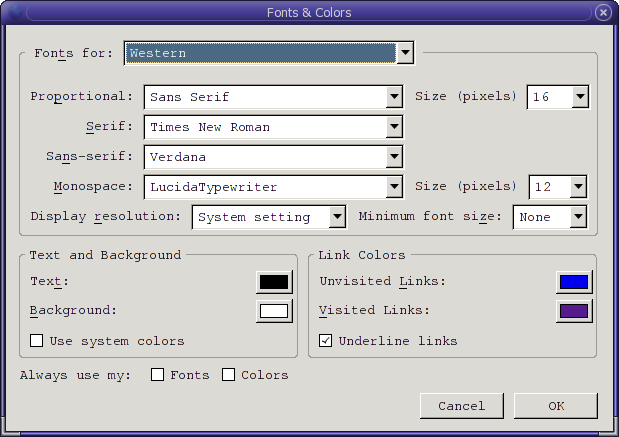
Also I am not an expert in font configuration, so if you know a simpler or cleaner way of installing fonts, please let me know.
Technorati: opensolaris
Friday, November 18, 2005
B27, ZFS, iwi, Athlon X2, etc
So many things happened this week - Miluim (military reserve service), build 27 released (ZFS), wireless drivers for Intel chipset finally hit the street (finally dumped FC4 from my laptop and installed Solaris), Athlon 64 X2 arrived for my office machine. And finally caught a flu at the end of the week :( Too many things to handle... The good thing, however, is that I writing this blog entry on my IBM ThinkPad T43 running Solaris Express B27 with iwi wireless driver - the only thing that I really miss is Skype.
Technorati: opensolaris
Wednesday, November 16, 2005
Solaris Express Community Edition b27a
Build 27 seems to be available. Note that files are named sol-nv-b27a-... Is it a respin of original build 27 ? Quick package list diff shows ZFS and Realtek gigabit driver were added.
Installing it right now on my new Athlon X2 machine...
Installing it right now on my new Athlon X2 machine...
Friday, November 04, 2005
OpenSolaris 20051103
Following the release of OpenSolaris build 26 tarball I updated Subversion repository too. Currently there are only ON (OS/Net consolidation) sources there.
Technorati: opensolaris
Wednesday, November 02, 2005
Installing Solaris on FC storage with MPxIO
This evening I got another IBM Blade server HS20 with FC HBA. I wanted to install Solaris on it and suddenly I realized that it is a great opportunity to test install/boot from FC storage. Fortunately I had a DS4300 storage array connected to the system with some spare space left on one of its volume groups. I tried that kind of installation about a year ago, but until new boot was integrated into Solaris booting from FC HBA had little chances to success.
So I booted the Blade from the CDROM and it readily presented the FC disk as a choice for the installation. It worth noting that DS4300 is connected via two controllers, so MPxIO merged two hardware nodes into one virtual. This very long name c5t600A0B800019D82F000014804368A7C0d0 is the name of the disk based on its GUID rather then on WWPN. DS4300 is an Active/Standby box, however MPxIO supports these kind of controller (Engenio-based) pretty well. So the installation went ahead and I went to drink tea. 10 minutes later it was over and after reboot I enabled the BIOS on QLogic FC HBA card and set the FC node and LUN to boot from. That's was it. Everything just played happily along.Here it is after the reboot:
# uname -a
SunOS b7 5.11 snv_25 i86pc i386 i86pc
And look where the root filesystem is mounted -
# df -h /
Filesystem              size   used  avail capacity  Mounted on
/dev/dsk/c5t600A0B800019D82F000014804368A7C0d0s0
                        14G   2.7G    11G    20%    /
Now, what constitutes that virtual disk
# luxadm disp /dev/rdsk/c5t600A0B800019D82F000014804368A7C0d0s2
DEVICE PROPERTIES for disk: /dev/rdsk/c5t600A0B800019D82F000014804368A7C0d0s2
  Vendor:               IBM
  Product ID:           1722-600
  Revision:             0520
  Serial Num:           1T53176260
  Unformatted capacity: 16384.000 MBytes
  Write Cache:          Enabled
  Read Cache:           Enabled
    Minimum prefetch:   0x100
    Maximum prefetch:   0x100
  Device Type:          Disk device
  Path(s):

  /dev/rdsk/c5t600A0B800019D82F000014804368A7C0d0s2
  /devices/scsi_vhci/disk@g600a0b800019d82f000014804368a7c0:c,raw
   Controller           /dev/cfg/c3
    Device Address              200600a0b819d830,0
    Host controller port WWN    2100000d6050ec96
    Class                       primary
    State                       ONLINE
   Controller           /dev/cfg/c3
    Device Address              200700a0b819d830,0
    Host controller port WWN    2100000d6050ec96
    Class                       secondary
    State                       STANDBY
Overall impression: very smooth integration of FC multipathing into boot subsystem. Many thanks to all the Sun' engineers involved with this framework.
Technorati: opensolaris Solaris
Saturday, October 22, 2005
OpenSolaris 20051021
I just updated OpenSolaris Subversion repository with fresh bits released by Stephen Lau - Nevada build 25 (aka OpenSolaris 20051021).
Thursday, October 06, 2005
Skype into WWOSUG Conf Call
I am typing this while being on World Wide OpenSolaris User Group conf call. Skype made our life much easier. The only thing is missing is Solaris Skype client. (And no, I am not running Windows, I run FC4 on my laptop)
Monday, October 03, 2005
OpenSolaris <pilot member> T-shirt has arrived !
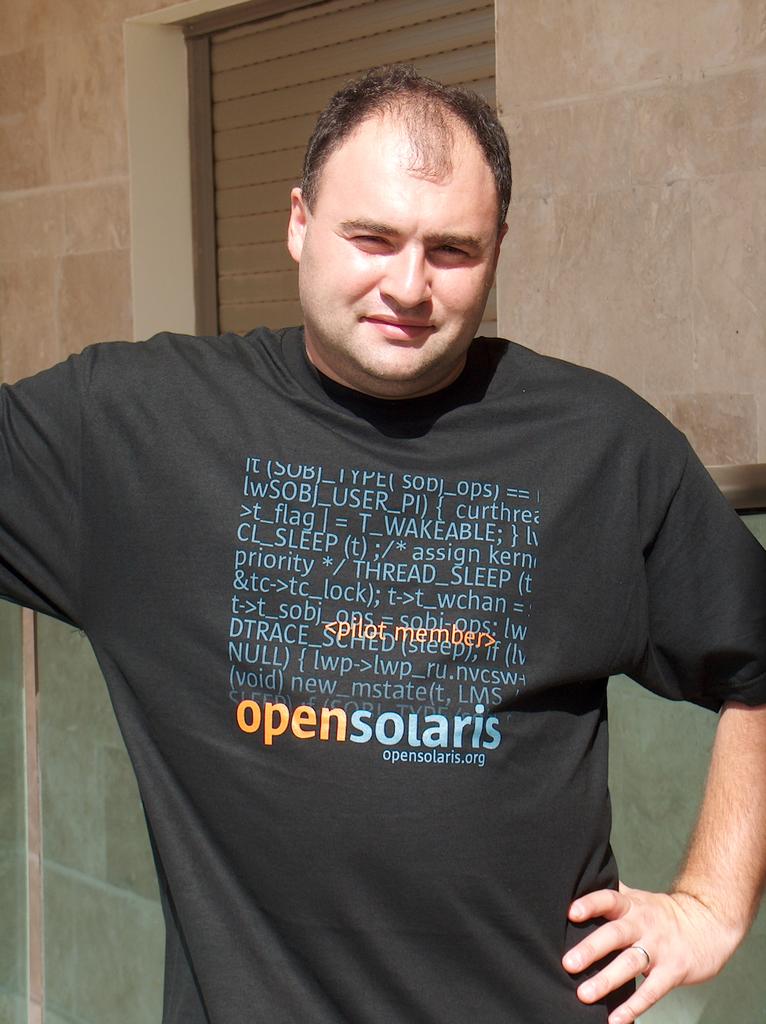
Today is "Erev Rosh HaShana" - Jewish New Year Eve - one of the two biggest Jewish holidays. And right today around 2:00 PM doorbell chimed and a FedEx courier appeared with a box. That was an OpenSolaris T-shirt. A special one - <pilot member> edition. A perfect gift for the holiday!
Wednesday, September 28, 2005
Nevada b23 on IBM Blade HS20 or trading swap for DVD
Well, I recently started at new place. There are many Linuxes here and quite few Solarises. Exactly one. And I had an interesting experience installing Solaris Nevada b23 on it. The machine is a IBM Blade Server HS20 (Nice thing, BTW). The DVD it equipped with is conected via USB and trust me - it is slooow. So when I installed b22 on it a week ago I just burned CDROM 1 of 4 and did a minimal installation. Now, when b23 is out I downloaded all 4 images and setup_install_server'ed it into this machine. At this point I realized that it would be not so simple to upgrade this machine - I didn't want to go through CDROM installation once again (I didn't even had 4 blank media for burning all the images!). And there is some weird problem with mounting NFS share from Linux on Solaris. To make it worth I was running out of time on that specific evening. So I had to come up with some idea pronto. And here is what I did:
I released swap partition (~ 2GB - I was lucky!), newfs it and copied the installation image into it. Then I booted off CD1 and when it asked for starting the installation I umounted the CDROM and mounted my ex-swap partition on /cdrom. Then I continued with installation and choose [currently mounted] swap partition as "preserved" and not mounted anywhere. That appeared to be enough. The installation went happilly on and I went home. Next morning I found system installed.
And here is what
I released swap partition (~ 2GB - I was lucky!), newfs it and copied the installation image into it. Then I booted off CD1 and when it asked for starting the installation I umounted the CDROM and mounted my ex-swap partition on /cdrom. Then I continued with installation and choose [currently mounted] swap partition as "preserved" and not mounted anywhere. That appeared to be enough. The installation went happilly on and I went home. Next morning I found system installed.
And here is what
prtdiag tells about it :
# prtdiag
System Configuration: IBM IBM eServer BladeCenter HS20 -[8832M1X]-
BIOS Configuration: IBM -[BSE120AUS-1.07]- 09/27/2004

==== Processor Sockets ====================================

Version                          Location Tag
-------------------------------- --------------------------
Intel Xeon                       Socket 1 CPU 1
Intel Xeon                       Socket 2 CPU 2

==== Memory Device Sockets ================================

Type    Status Set Device Locator      Bank Locator
------- ------ --- ------------------- --------------------
DDR     in use 1   DIMM1               Slot 1
DDR     in use 1   DIMM2               Slot 2
DDR     in use 2   DIMM3               Slot 3
DDR     in use 2   DIMM4               Slot 4

==== On-Board Devices =====================================
ATI Rage XL
Ethernet 1 Broadcom 5704 Ethernet Controller
Ethernet 2 Broadcom 5704 Ethernet Controller
IBM Automatic Server Restart - Integrated System Management Processor
Q-Logic FibreChannel Card

==== Upgradeable Slots ====================================

ID  Status    Type             Description
--- --------- ---------------- ----------------------------
Thursday, September 01, 2005
Nevada B21 on Dell Latitude D610
I am running Nevada on my laptop (Dell Latitude D610) for quite some time now. I think I started with build 17 or so and upgraded it with each new build released as Solaris Community Express. Every time I tried an upgrade I had problem with network boot. The pxegrub loaded from the boot server claimed that there is no network interface (how ironically!). So I ended up with a bunch of Solaris x86 1/4 disks (one for each build). I booted off the CDROM and then chose NFS as a repository. Worked well, but made me feel dummy. Build 21 changed this completely. pxegrub loaded and quickly discovered ethernet and continued to the boot menu. At this point I was happy and started the installation/upgrade anxiously. There were unpleasant surprise down the road, nonetheless. When it came to X autoconfiguration it probed Intel 915 embedded graphics chipset and failed the test color screen. In previous build that step was easy and worked. Well, you could choose any resolution as long as it is 800x600. Apparently, after the installation when Xorg is overtaking the job it displays normal 1024x768, but during the installation Xsun is limited to 800x600. The workaround turned out to be simple - VESA 915 nicely presented by kdmconfig. Same 800x600 resolution and you have your system ready for install or upgrade. Nothing special after that point.
There was no public info on what fixes went into build 21, so there could be some lurking features. No new packages, however, comparing to build 20.
There was no public info on what fixes went into build 21, so there could be some lurking features. No new packages, however, comparing to build 20.
Wednesday, August 24, 2005
Leaving Cloverleaf
Every once in a while it happens to most of us - leaving the job for another one. Seems like it is time for me to do so. So, goodbye Cloverleaf. It was an interesting job and I learned a lot. I hope that people working with had a chance to learn from me too, so it was beneficial for everyone. And I like to wish all the best to the Cloverleaf team.
Saturday, August 20, 2005
First community contribution to OpenSolaris
In one of my last posts I promised to tell more about why OpenSolaris Contributor agreement is needed. Well, it is time to do so. OpenSolaris 20050818 (eq Nevada build 20) is finally up on http://cvs.opensolaris.org and among other integrated things there is a contribution made by your humble servant. The problem that I've fixed is quite small and affected a tiny percentage of Solaris x86 user base, but what is important is the fact itself. Community is participating in OpenSolaris development. And I am by no means alone. Right now sponsor (Sun engineer) is needed to perform an actual putback on behalf of the community member, but that is going to change in the future, as the SCM platform for OpenSolaris will be set and the process will be streamlined.
Friday, June 24, 2005
OpenSolaris Contributor Agreement # OS0001
Gee, just got a notification that my OpenSolaris Contributor Agreement was received and got number OS0001 ! More info on why this is needed soon...
Monday, June 13, 2005
OpenSolaris L-day
So - June 14, 2005 - and Solaris becomes open source project. I am proud to be a member of the OpenSolaris Pilot project since moment zero and I can tell that I learned a lot about Solaris and how the development process works. And I really enjoyed what I learned.
So, what now ?The PowerPC community is open for everyone. The source repository is up. Looks like we can get moving !
opensolaris

Tuesday, May 17, 2005
OpenSolaris becomes [some] part of my day job
I was working on that for quite some time and it just brought a fruit. My employer, Cloverleaf Communications,officially allocated up to 20% of my day job time to OpenSolaris activity (which translates roughly to one day a week). I have to decide now whether to bring my Pegasos II back to office or to setup a tunnel from the office into my home network. So... back to OpenSolaris/PPC (I actually like Polaris) port !
Subscribe to:
Posts (Atom)